Appearance
Account Lifecycle
FreshSource: BIBLE.md (Phase 6 Account Store), bible/understand-everything.md (account system)
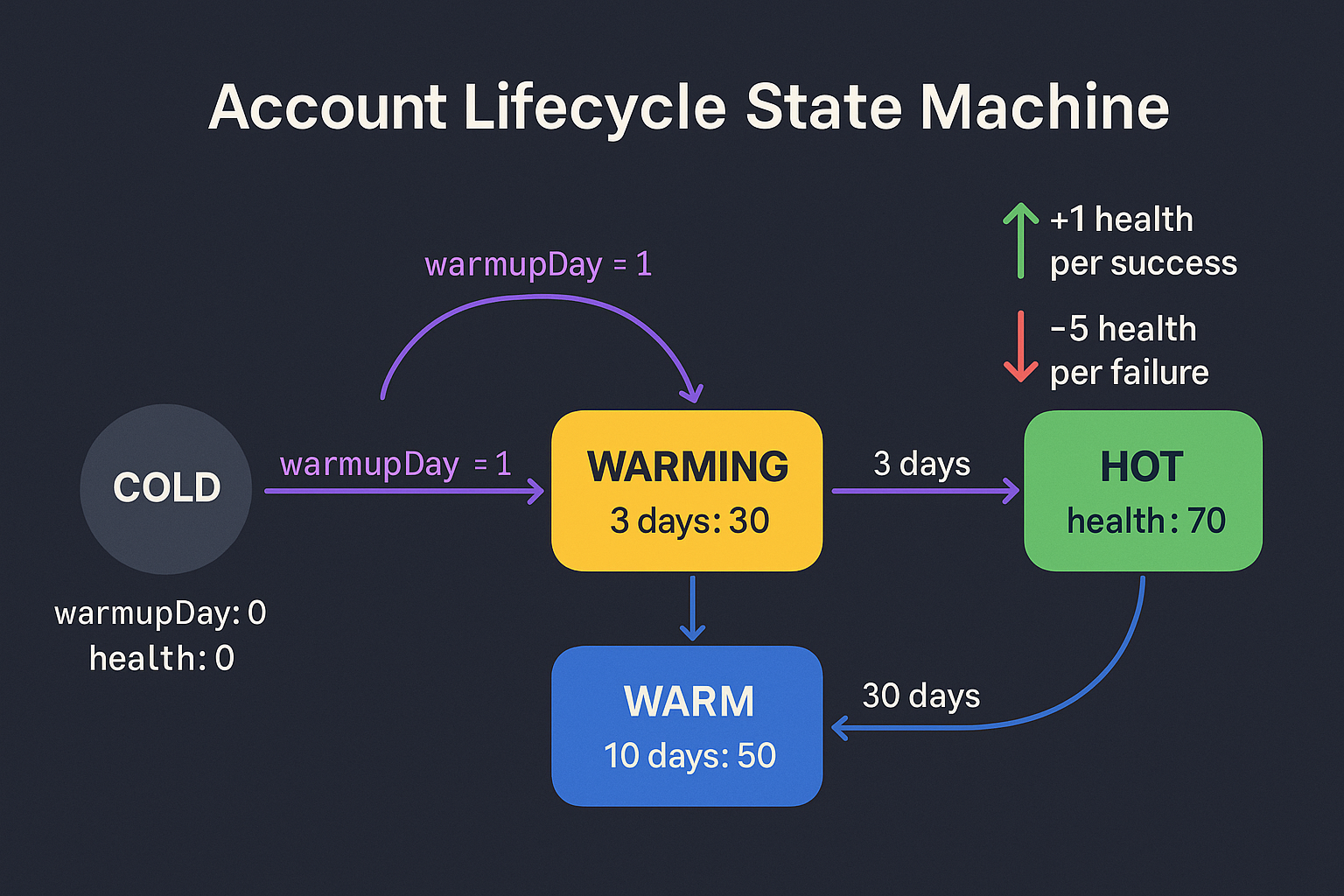
Accounts are stored as DAM cards (Digital Asset Management): a schema cloned from browser-sender. Each card contains identity, auth, proxy, fingerprint, health, and lifecycle data.
DAM card schema
yaml
account:
  identity:
    email: someone@gmail.com
    name: Persona name
    persona_data: { ... }
  auth:
    cookies: AES-256-GCM encrypted
    session_data: { ... }
    password: AES-256-GCM encrypted
  proxy:
    married_to: 1.2.3.4:8080
    credentials: AES-256-GCM encrypted
  fingerprint:
    encrypted_config: { ... }
  health:
    score: 0-100
    last_check: 2026-05-20
    failure_history: []
  lifecycle:
    phase: 0-3
    status: cold | warming | warm | hot | quarantined | dead
    warmup_day: 0-90
  activity:
    last_action: ...
    counters: { post, comment, like, follow }
  lock:
    locked_by: campaign-id or null
  paths:
    profile_dir: data/mini-engine-v2/profiles/{id}
    cookie_jar: data/mini-engine/cookies/{id}.json
  metadata: { ... }
Phase state machine
stateDiagram-v2
  [*] --> Cold: New account
  Cold --> Warming: Phase 0 to 1
  Warming --> Warm: Phase 1 to 2
  Warm --> Hot: Phase 2 to 3
  Hot --> Hot: Stable, production-ready
  Warming --> Quarantined: Failure threshold
  Warm --> Quarantined: Failure threshold
  Hot --> Quarantined: Failure threshold
  Quarantined --> Warming: Unquarantine after fix
  Quarantined --> Dead: 5 consecutive failures
  Dead --> [*]
Phase thresholds
| Phase | warmupDay | health | What it can do |
|---|---|---|---|
| 0 (cold) | 0 | 0 | Imported, no activity yet |
| 1 (warming) | 3 | 30 | Generic searches, organic clicks |
| 2 (warm) | 10 | 50 | Light platform engagement |
| 3 (hot) | 30 | 70 | Full CTR, posting, cascades |
Phase advances automatically when criteria met, or manually via POST /accounts/:id/advance-phase.
Health scoring
Health adjustments:
- Success: +1
- Failure: -5
- 5 consecutive failures: quarantine
Real health checks (run by account-health plugin):
| Component | Weight |
|---|---|
| Google login state | 40 pts |
| CAPTCHA/block detection | 30 pts |
| Search capability | 20 pts |
| Proxy connectivity | 10 pts |
Account state during a campaign
stateDiagram-v2
  [*] --> Idle
  Idle --> Running: Campaign picks account, locks it
  Running --> Cooling: Success (1 to 3 min cooldown)
  Running --> Cooling: Failure (exponential backoff)
  Cooling --> Idle: Cooldown complete
  Running --> Dead: 5 consecutive failures
  Idle --> Idle: Wait for next round
Backoff after failure: 1 min, 2 min, 4 min, 8 min, up to 60 min max.
30-day warmup plan (account-harden.mjs)
Six-step account aging over 90 days:
| Day | Action |
|---|---|
| 7 | Profile photo upload |
| 14 | Display name change |
| 14 | Birthday set |
| 21 | Recovery email added |
| 60 | Password change |
| 90 | Backup codes generated |
Warmup activity (account-warmup plugin)
Real warmup flow:
- Launch browser with account fingerprint and proxy
- 3 to 7 generic searches (100+ query bank across 10 categories)
- Click 1 to 2 organic results per search using real coordinates
- Dwell with scrolling
- 30% chance: visit YouTube or News between searches
Query categories: weather, news, food, tech, entertainment, howto, travel, shopping, health, random.
Lock/unlock during campaigns
Campaigns must lock an account before using it:
bash
# Lock for a campaign
curl -X POST http://localhost:4700/accounts/abc123/lock \
  -H "Content-Type: application/json" \
  -H "x-api-key: ghost-engine-key" \
  -d '{"campaignId":"dallas-junk-removal"}'

# Mark action result
curl -X POST http://localhost:4700/accounts/abc123/mark-action \
  -H "Content-Type: application/json" \
  -d '{"type":"ctr","result":"success"}'

# Release
curl -X POST http://localhost:4700/accounts/abc123/unlock
Quarantine
bash
# Quarantine an account
curl -X POST http://localhost:4700/accounts/abc123/quarantine \
  -H "Content-Type: application/json" \
  -d '{"reason":"flagged by platform"}'

# Restore
curl -X POST http://localhost:4700/accounts/abc123/unquarantine
Quarantined accounts will not be picked by campaigns. They sit in the store with their reason recorded until manually restored.
Army status
Aggregate view of the whole account pool:
bash
curl http://localhost:4700/accounts/army-statusReturns counts by status, phase, client, and health bucket.
Importing accounts
50 accounts were imported from V1's registry during initial setup. The full registry has 340+ Gmail accounts.
bash
# Bulk import from registry.json
curl -X POST http://localhost:4700/accounts/import \
  -H "Content-Type: application/json" \
  -d '{"registryPath":"./data/account-identity/registry.json","dryRun":true}'

# CLI equivalent
node cli.mjs accounts import --registry <path> --dry-run
Related
- account-store: the underlying core module
- account-warmup plugin: execution layer
- account-health plugin: browser-based health checks
- warmup-system plugin: 30-day planner
- Workflow: Account Warmup: end-to-end procedure